

Update: Checked for new Code a Business codes on June 05, 2026.
Code a Business puts you in charge of a tech startup with ambitions to become a full-scale digital empire. You hire developers, upgrade office hardware, tap into the stock market, and collect assets like NFTs to compound your earnings. Diamonds are the key currency for accelerating your progress, while potions provide timed boosts to income, mining luck, and NFT luck. The game originally launched as Coding Simulator 2 and was later renamed — both titles refer to the same experience, so if you're searching for Coding Simulator 2 codes, you're in the right place.
Working Code a Business codes
1mvisits— 5,000 Diamonds and 1 Bronze Employee Pack NEW500kvisits— 1x Cash Potion 3, 1x Diamonds Potion 3, 1x NFT Luck Potion 3, and 1x Mining Luck Potion 3 NEW1000diamonds— 1,000 Diamonds NEW
Codes are case sensitive, so enter them exactly as shown. Copy-pasting directly is the safest way to avoid a mismatch that triggers an invalid code error.
How to redeem Code a Business codes
There is one prerequisite before anything else: you must be a member of the RoDark Studios Community on Roblox. Joining is free and takes only a moment, but without membership the code panel will not process submissions correctly.
Step 1: Launch Code a Business in Roblox and wait until you are fully loaded into the game world.
Step 2: Click the Buy button on the left side of the screen. This opens the Shops building interface.
Step 3: Locate the NPC with Verify displayed above her head and press or hold E to interact. The code redemption panel will open.
Step 4: Scroll to the bottom of the menu to find the Enter Codes box. Paste or type your code into the field and click Submit.
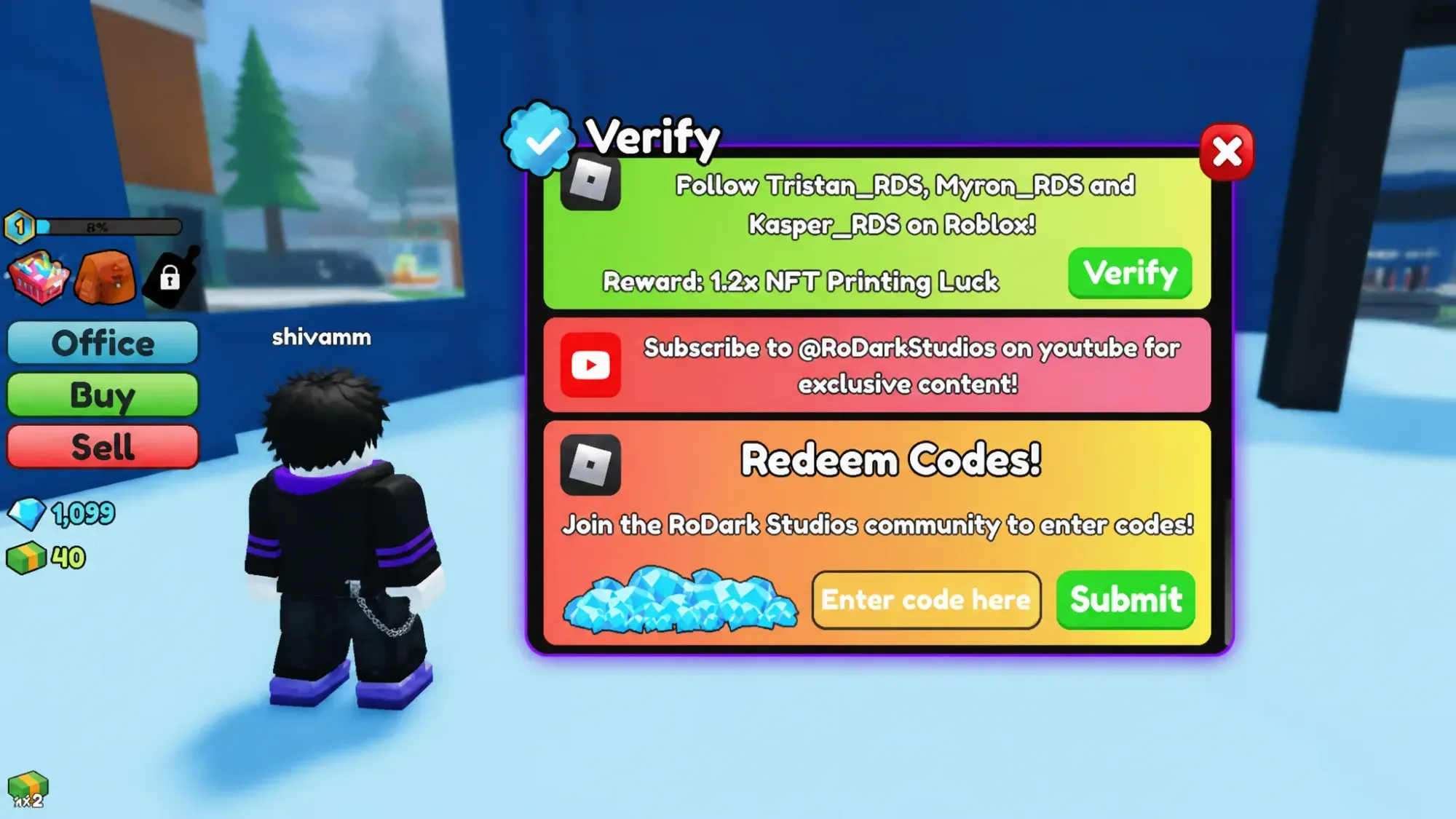
Rewards appear on the right side of the screen immediately after a successful submission. Diamonds are credited to your balance right away, and potions land in your inventory to use whenever you're ready.
How to get more Code a Business codes
New codes arrive without a fixed schedule, so there is no reliable way to predict exactly when the next batch will drop. The Code a Business Discord server is the most direct place to catch announcements straight from the development team — you can also use it to suggest features, trade with other players, and report bugs. The RoDark Studios Community group page on Roblox is another place where updates surface. Keep this page bookmarked as well, since expired codes are pulled from the list as soon as they stop working, so only codes you can actually redeem right now remain above.